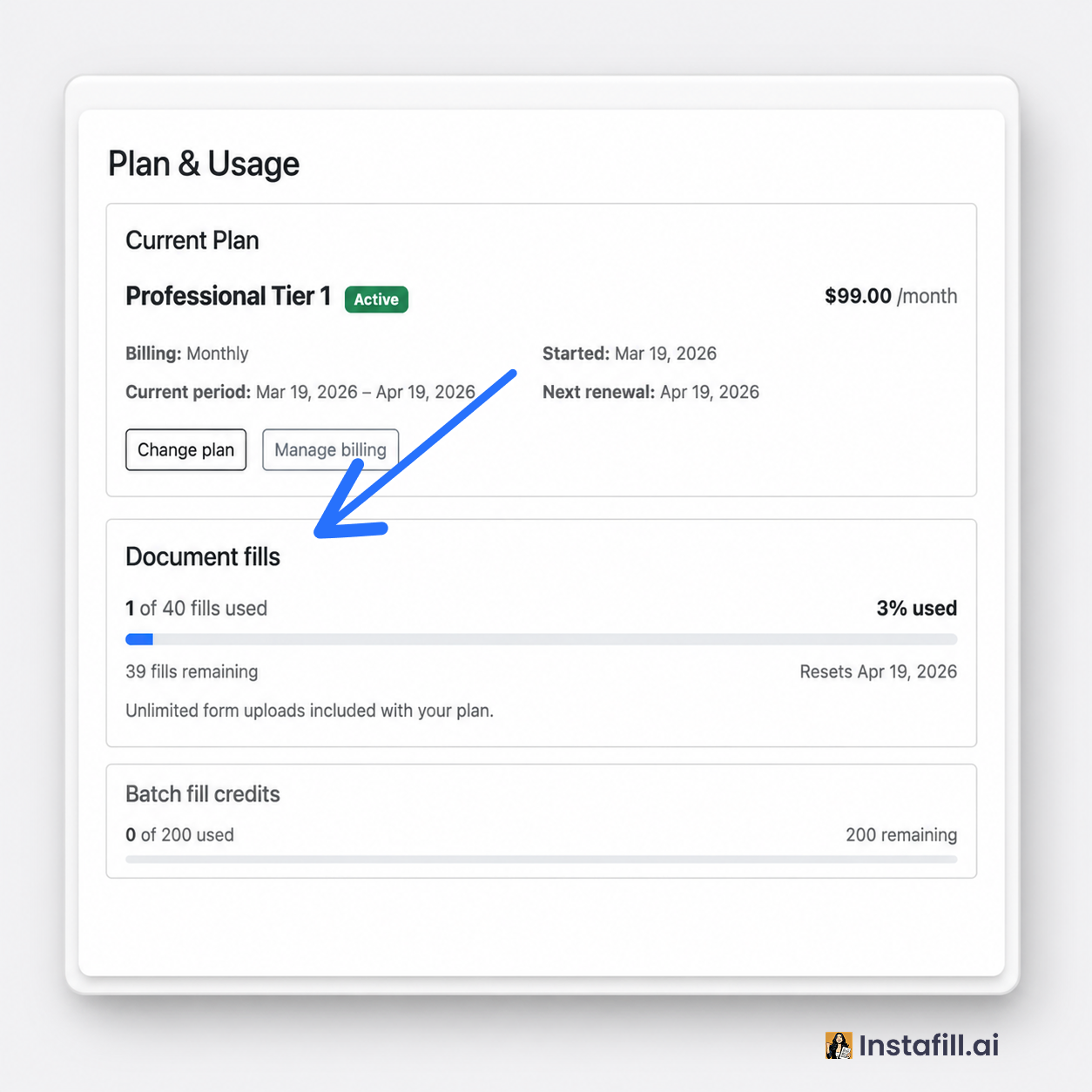
Instafill.ai runs on a credit system. Every paid or free account has a pool of credits that refills on a schedule.
This article explains how plans, credits, and usage work at Instafill.ai: what counts against your quota, when credits reset, what’s limited on the free plan, and how the Professional and Business tiers differ.
One credit, one document
One credit fills one document. No per-page pricing, no per-field charges. Whether your form is 1 page or 30 pages, 5 fields or 1,000 fields, when Instafill.ai turns a blank PDF into a filled one, that’s one credit.
Example. Maria fills a 28-page residential purchase agreement with 140 fields. Cost: 1 credit. Tom fills a one-page W-9 tax form with 8 fields. Also 1 credit.
You start with 10 free credits a year
Sign up and you immediately get 10 free credits, refreshed once a year. Those credits are shared between uploading new forms and filling individual documents. Use them whenever you like throughout the year.
Example. Priya uploads 3 new forms and then completes 7 one-off fills, the full 10-credit starter pool is gone.
The Plan & Usage page in your account settings shows exactly where you stand:
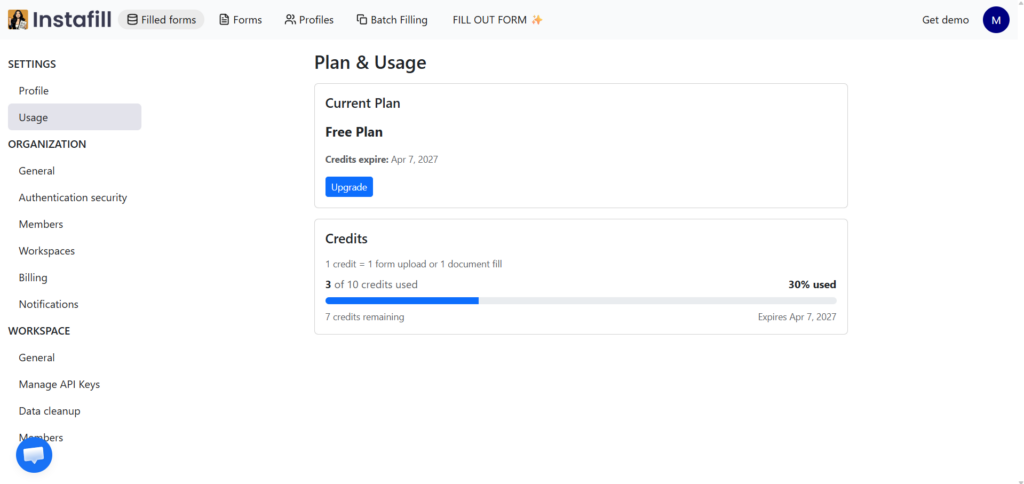
The free plan never expires. Every year, your credits refresh, whether it’s your first year or your fifth.
Free plan limits
The free plan is built for evaluation, not production work. Three limits apply to every free account, and they’re worth understanding before you start.
Only the first two pages of any form are filled
When you fill out a form on the free plan, Instafill.ai processes only the first two pages of the document, regardless of total length. A two-page ABA Authorization Request fills out completely. A 30-page mortgage application fills only pages 1 and 2. Pages 3 through 30 stay blank in the output PDF.
Filled forms cannot be downloaded
The free plan lets you upload a form, run an AI fill, and review the result on screen, but the Download button is paid-plan only. This is the most common reason free users upgrade. The free credits exist so you can confirm that Instafill.ai handles your specific forms accurately. Once that’s confirmed, the paid plan is what turns the filled preview into a usable file.
Batch filling is not available
Batch filling, the feature that fills hundreds of forms from a single CSV or Excel sheet, is a paid-plan feature. The “Fill out form in batch” option appears in the form menu on every account, but if you want to test batch filling on real data, a Professional or Business account is required.
Basic AI models only
Free accounts use Instafill.ai’s basic AI models. Paid accounts use more accurate, advanced reasoning models that produce better results for complex layouts, ambiguous fields, and forms with non-standard structures.
If your evaluation depends on full-document processing, batch filling, or higher accuracy on tricky forms, those need a paid plan to test properly.
The two paid plan families
Paid accounts come in two families, each with multiple Tiers you can size up or down:
- Professional: for individuals and small teams. 2 users included. Covers the core workflow: upload, fill out, batch, edit, e-sign, download.
- Business: everything in Professional, plus unlimited users, reusable data profiles, API/webhook/MCP/email automation.
Within each family, higher tiers give you more credits per month. You can switch tiers at any time. Upgrades take effect immediately; downgrades apply at your next renewal. Tier-by-tier numbers live on the Instafill.ai pricing page.
You can also toggle monthly vs annual billing. Annual is cheaper per month, but you still get a monthly credit refill – not a year’s worth dumped at once.
Example (monthly). A team on a Tier-1 Business plan with 100 fills/month, billed monthly on the 14th. On April 14th the bucket refills to 100. They use 87 in April. On May 14th it resets to 100. The 13 unused credits don’t carry over.
Example (annual). Same tier, annual billing. They still get 100 fresh credits on the 14th of every month, not 1,200 at once.
The monthly refill applies to both billing cadences. Annual just changes what you pay, not how the credits arrive.
What changes on a paid plan
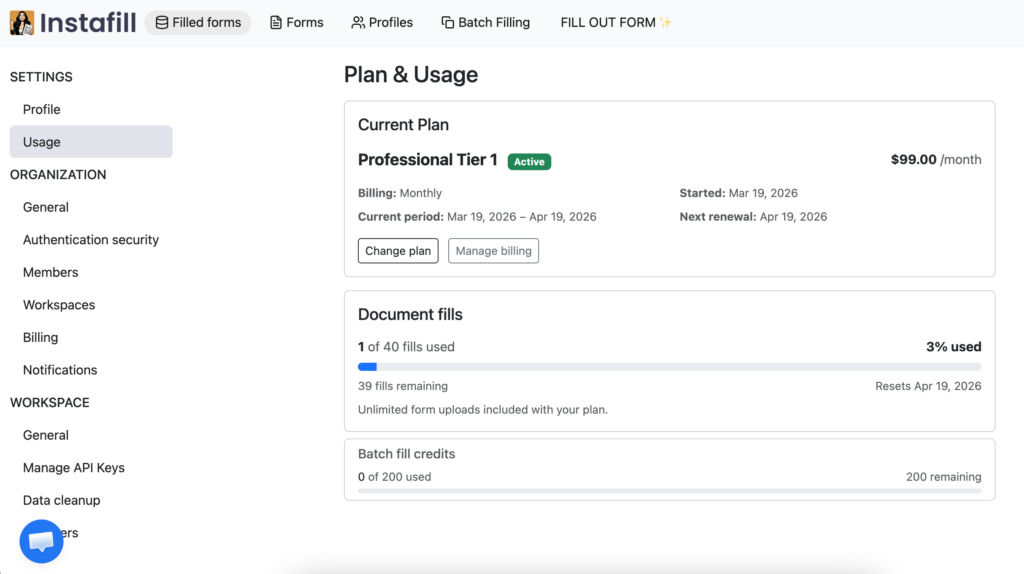
Each Tier comes with its own number of fills per billing period, plus two upgrades over the free plan:
- Uploading new templates becomes free. Adding forms no longer counts against your fill total. You can build out a full library of reusable PDF templates without touching your monthly fill quota. This matters more than it sounds. A typical professional account ends up with dozens of PDF forms and automatically converted from flat to fillable form templates, and on the free plan, every upload eats into your fill quota.
- Batch fills get their own, much bigger pool. On top of your monthly fill count, paid plans get a separate batch-fill pool that’s five times the size. Both Professional and Business tiers include it.
Example. A Tier-1 Professional plan with 50 fills/month gets:
- 50 regular credits for individual fills
- 250 batch-fill credits for batch jobs
Wednesday: the team runs a 100-row batch fill from a CSV. Batch pool drops from 250 to 150. Regular pool is still 50.
Thursday: an urgent one-off form needs filling. Regular pool drops from 50 to 49. Batch pool stays at 150.
Friday: another 250-row batch is started. Only 150 batch credits are left, so rows 1 to 150 complete and rows 151 to 250 are blocked until the next cycle (or an upgrade).
Higher tiers get proportionally larger batch pools. If you run routine bulk imports, like a food-truck operator filling 250+ Michigan permits per season or a construction firm batch-filling NJ ST-8 tax exemption certificates, the batch pool usually determines which tier fits, not the regular pool.
What doesn’t cost a credit
Failed fills. If something breaks on our side, you’re not charged.
Example. Diego starts filling a tax form but the source PDF is corrupted and the fill fails. Cost: 0 credits. He uploads a clean version and the retry succeeds. Total cost: 1 credit, not 2.
Retries. You pay for the result, not the attempts.
Example. Sara fills an insurance form but the wrong policy number was extracted. She updates the source and re-runs. The second attempt succeeds. Cost: 1 credit total.
Uploading forms (paid plans). Unlimited.
Example. A Business-plan team uploads 47 fillable PDFs before a client onboarding. Cost: 0 credits. Uploads only count against quota on the free plan.
Editing, downloading, sharing. None of these touch your balance. Credits are spent only on filling.
What does cost a credit
| Action | Cost |
|---|---|
| Fill an individual document | 1 regular credit |
| Fill one row in a batch | 1 batch-fill credit |
| Autofill triggered by email or webhook (Business) | 1 regular credit |
| Upload a form (free plan only) | counts against your 10 credits quota |
Webhook example. A Business-plan customer has a Zapier integration piping contract requests into Instafill. Three contracts arrive overnight; three filled PDFs are waiting in the morning. Cost: 3 regular credits, debited like manual fills.
If your plan reaches its monthly limit, the API returns an error response rather than processing the fill. Your integration should handle this case by checking the response and either pausing the job or alerting the team to upgrade.
Pre-allocated, not metered
Credits are pre-allocated at the start of each cycle, not counted up as you go. The number in your dashboard is exact and live. If it says 47, it’s 47.
Example. On the 22nd of the month, a team’s dashboard reads 47 regular / 200 batch. Those are the exact, available-right-now counts.
You can’t accidentally overshoot. You simply run out, and we’ll let you know.
When you run out
If your pool hits zero mid-cycle, we redirect you to the pricing page. Everything you’ve already done stays in your account – filled documents, forms, history. You just can’t start new fills until the next refill or an upgrade.
Example. Tomas is on Tier 1 Professional tier. By the 19th he’s used all his regular credits. The “Fill” button redirects him to pricing. His existing filled documents are still downloadable as always. He can wait 11 days for the next cycle, or upgrade.
Upgrades take effect immediately with a full allotment for the rest of the cycle.
Example. Tomas upgrades from Tier 1 Professional to Tier 1 Business. His balances jump to the new tier’s regular and batch amounts immediately, available for the rest of the current cycle. Next renewal, he gets a fresh full allotment again.
Downgrades apply at the end of your current billing period.
When credits expire
Credits don’t roll over. Whatever’s unused at cycle end resets to a fresh allotment.
Example. A team uses 65 of 100 regular credits in May. On the June 14th renewal, the 35 unused credits expire and the pool resets to 100. Same for batch credits.
This is deliberate: rolling balances make billing feel like a savings account. We’d rather give you a generous, predictable monthly bucket.
FAQ
Do my credits expire if I don’t use them?
At the end of each billing period, yes. Unused credits reset to a fresh allotment on your renewal date. They don’t roll over.
Can I download filled forms on the free plan?
No. Free accounts can upload forms, run AI fills, and review the results on screen, but the Download button requires a paid plan. The free credits are designed for evaluating accuracy, not for producing finished files.
Can fill out PDF forms in batch on the free plan?
No. Batch filling is a paid-plan feature. Selecting “Fill out form in batch” on a free account redirects to the pricing page. To test batch filling, you’ll need at least the entry-level Professional plan.
Why are only the first two pages of my form being filled out?
That’s the free plan’s processing limit. Free accounts process only the first two pages of any form, regardless of total length. Paid plans process the full document.
What’s the difference between basic and advanced AI models?
Free accounts use basic AI models. Paid accounts use advanced reasoning models that handle complex layouts, ambiguous fields, and unusual form structures more accurately. The difference is most noticeable on long forms, multi-column layouts, and forms with conditional logic.
Can I switch between Professional and Business mid-cycle?
Yes. Upgrades take effect immediately and you get a full new allotment for the rest of the cycle. Downgrades apply at the end of the current billing period.
Does batch filling cost more or less per form than individual filling?
The per-form cost is the same: one credit per filled form. The difference is the pool. Batch fills draw from a separate pool that’s five times the size of your regular pool, so high-volume customers don’t burn through their regular credits running bulk jobs.
What happens to my filled documents if I cancel my paid plan?
They stay accessible during your remaining billing period. You can also configure automatic data cleanup on a schedule if you want filled documents and source data deleted automatically, regardless of subscription status.
Are there volume discounts above the listed tiers?
Yes. Enterprise contracts can include higher volumes, dedicated processing queues, and per-workspace quotas. Book a demo to discuss.
Does the free plan ever expire?
No. The 10 free credits refresh once a year, every year, not just the first. It’s a real free tier, not a time-limited trial.