Instafill.ai can now replicate how you write. When filling out form fields that require generated text – clinical notes, legal summaries, incident narratives – the AI matches your tone, phrasing, and formatting. Upload a previously completed form, and it formats things the way you usually do.
The problem
Complex forms – healthcare documentation, construction permits, legal contracts – often contain fields that need more than simple data entry. These fields require generated text: behavioral observations from therapy sessions, project descriptions from site reports, incident narratives from call transcripts.
Even when the AI fills out these fields correctly with accurate information, the writing style is generic. Common signs include:
- Overly formal or stilted phrasing that doesn’t match how you actually write
- Excessive use of em dashes (-) where commas or periods would be more natural
- Generic vocabulary that sounds like it came from a template
- Repetitive sentence structures that lack variation
- Unnatural transitions between ideas
For professionals who need documents to sound authentic – whether for client-facing materials, legal submissions, or medical records – this means extra editing time after every form. The information is correct, but the voice is wrong.
How it works
You provide writing samples – either by uploading a previously completed form or by adding examples per field manually – and the AI uses those samples as references when generating text. It analyzes your tone, vocabulary, sentence structure, and formatting, then applies those patterns automatically. The result sounds like you wrote it.
From a technical standpoint, this uses few-shot prompting. Fields with examples are processed individually with higher attention, so the model focuses on matching your reference text rather than producing generic output. Fields without examples still fill accurately using the standard AI – the difference is noticeable only in fields where voice and phrasing matter.
When you provide examples, the AI studies multiple dimensions of your writing:
- Tone and formality level: Professional vs conversational, direct vs diplomatic
- Vocabulary choices and phrasing patterns: Technical terms, industry jargon, preferred synonyms
- Sentence structure: Length, complexity, use of compound sentences
- Formatting preferences: Punctuation style, use of lists or paragraphs
This analysis happens automatically. You don’t need to explain your style – the AI learns it from your examples.
Setting up examples by uploading a filled form
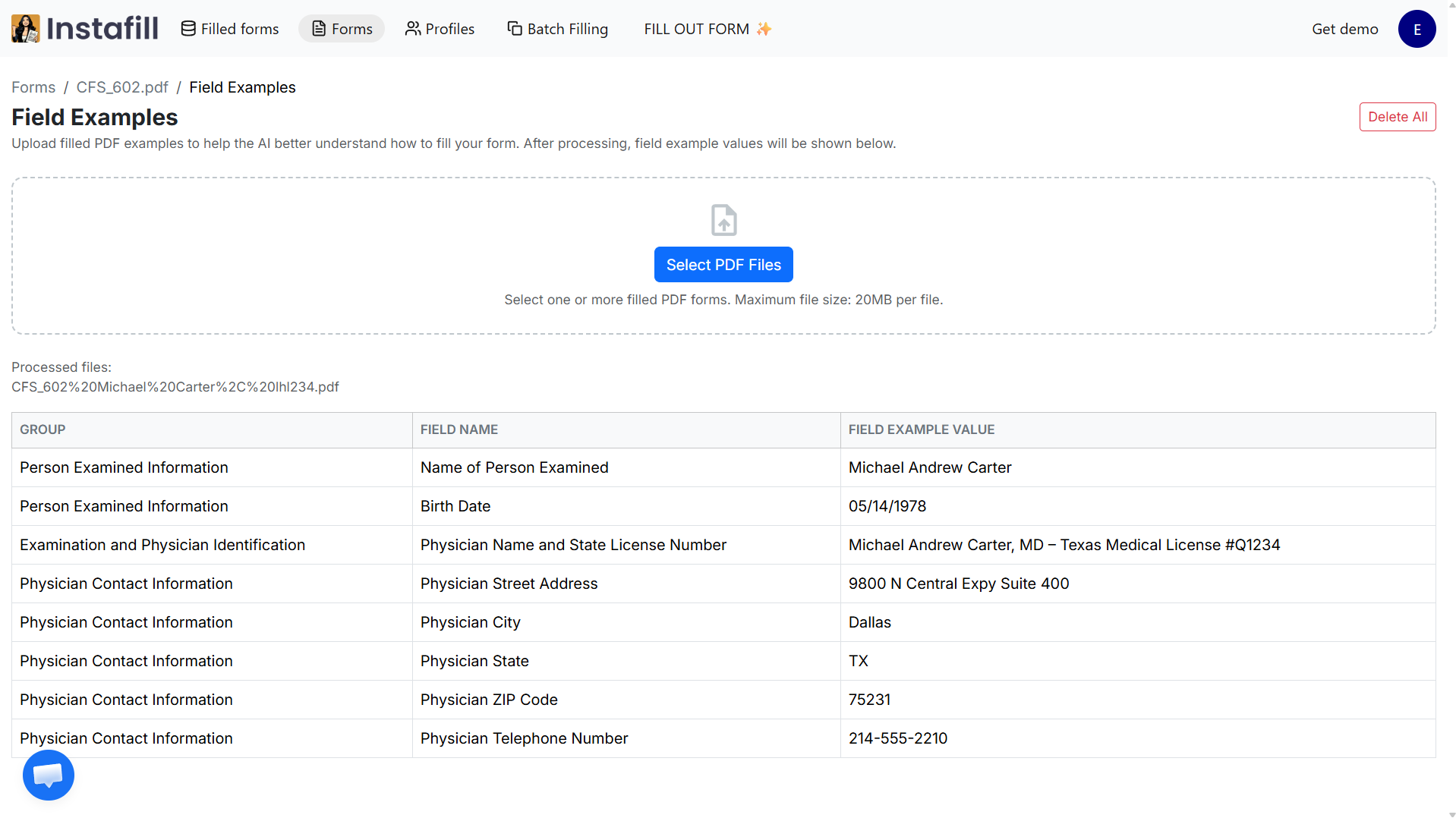
The fastest way to get started is to upload a previously completed version of the form. Instafill.ai reads the file, maps the filled values to each field, and automatically creates a reference table – no manual copying required.
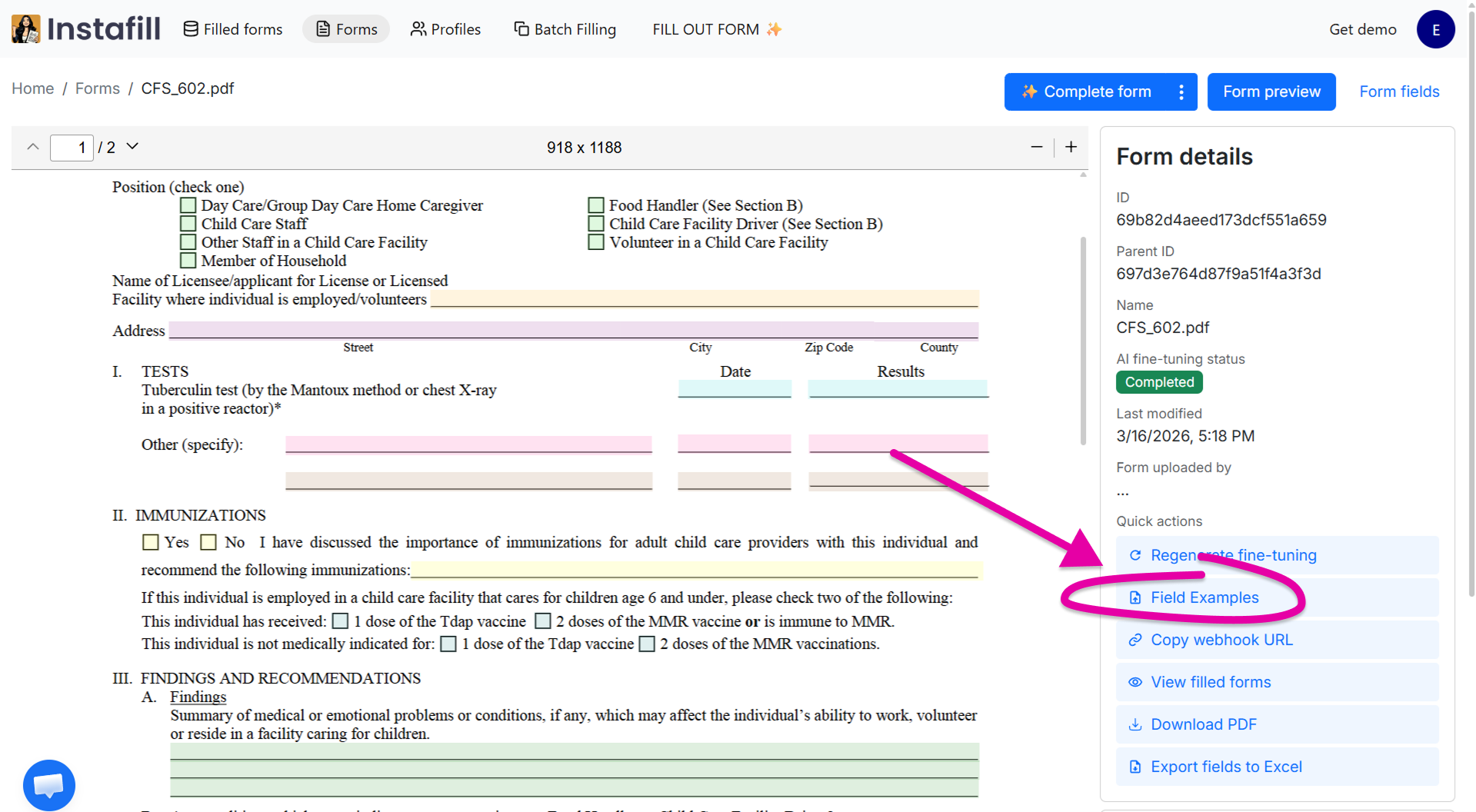
Open any form in your Forms section. On the form details page, click Field Examples in the Quick actions panel on the right.
Upload a previously filled PDF of that form. Instafill.ai reads the file, maps the filled values to each field, and automatically creates a reference table.
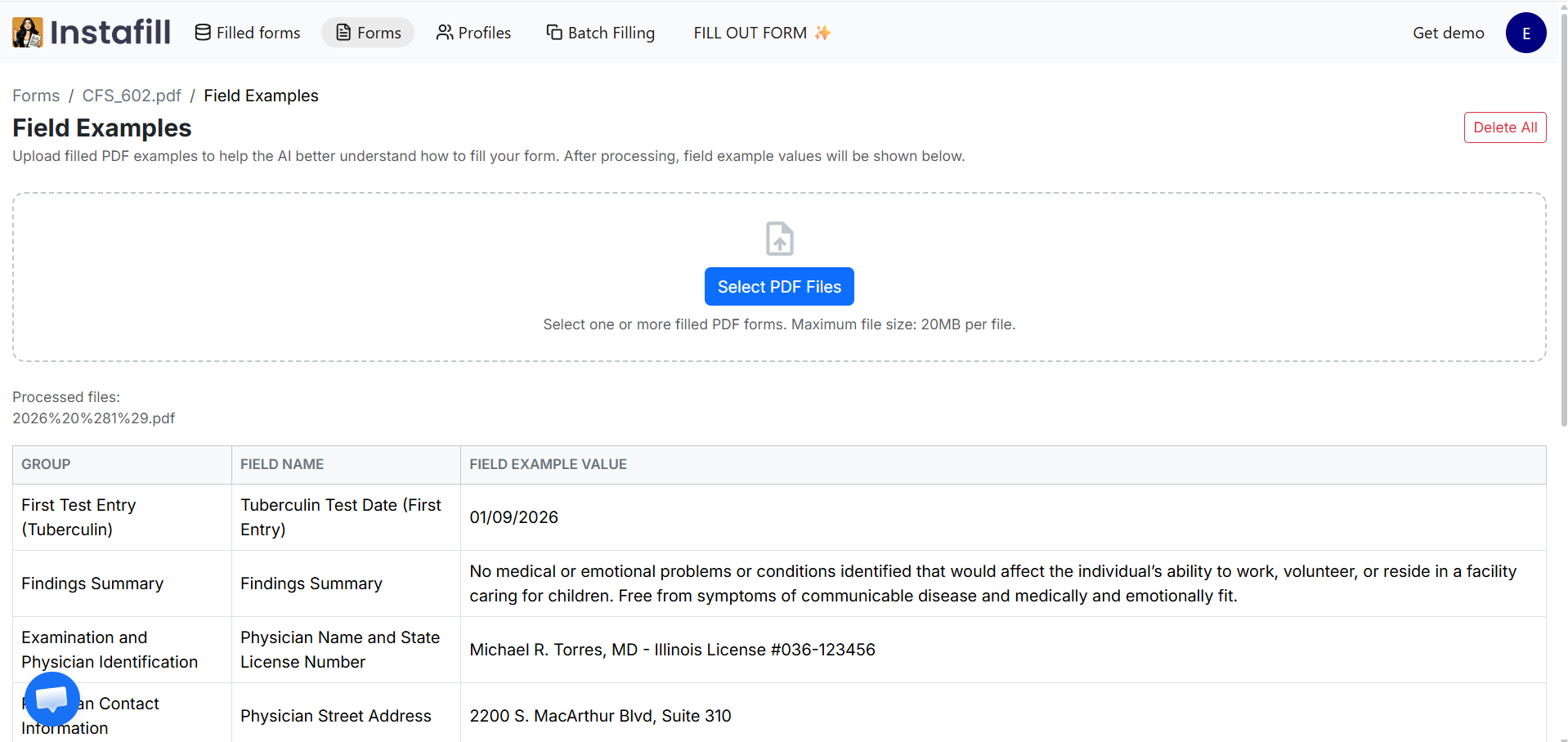
The next time you fill out that form, the AI references those examples when generating text – matching your formatting, phrasing, and terminology. You can upload multiple forms for the same template. The more examples you provide, the better the AI understands your style, especially for longer narrative fields.
A few things to know
- You can upload multiple PDFs per form – up to 20MB per file
- Works for text fields, checkboxes, and radio buttons. Table fields are not yet supported
- More examples generally produce better results, especially for longer narrative fields
Adding examples manually per field
If you want to set the style for specific fields without uploading an entire form, you can add writing samples manually. Each field has an Examples tab in the field editor. Add one or more examples of how you’d write that field, and the AI will match that style every time it fills it out.
There’s no limit to how many examples you can add per field. Quality matters more than quantity – choose examples that represent how you’d ideally write that field, not rushed or atypical entries.
Step-by-step: Adding examples manually
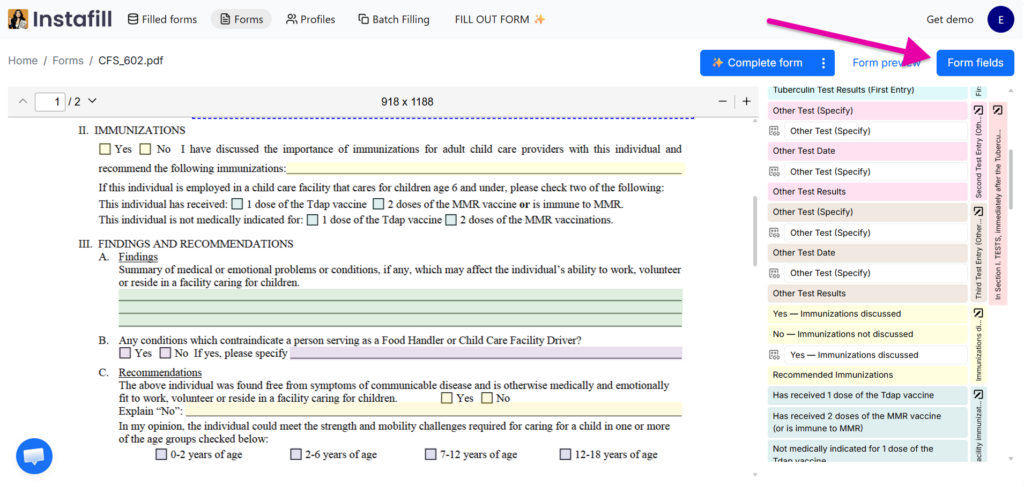
Step 1: Open any form and click Form fields in the top right corner of the form page.
Step 2: Click Edit on the field you want to customize. The field editor modal will open.
Step 3: Navigate to the Examples tab. You’ll see three tabs: General, Dependencies, and Examples.
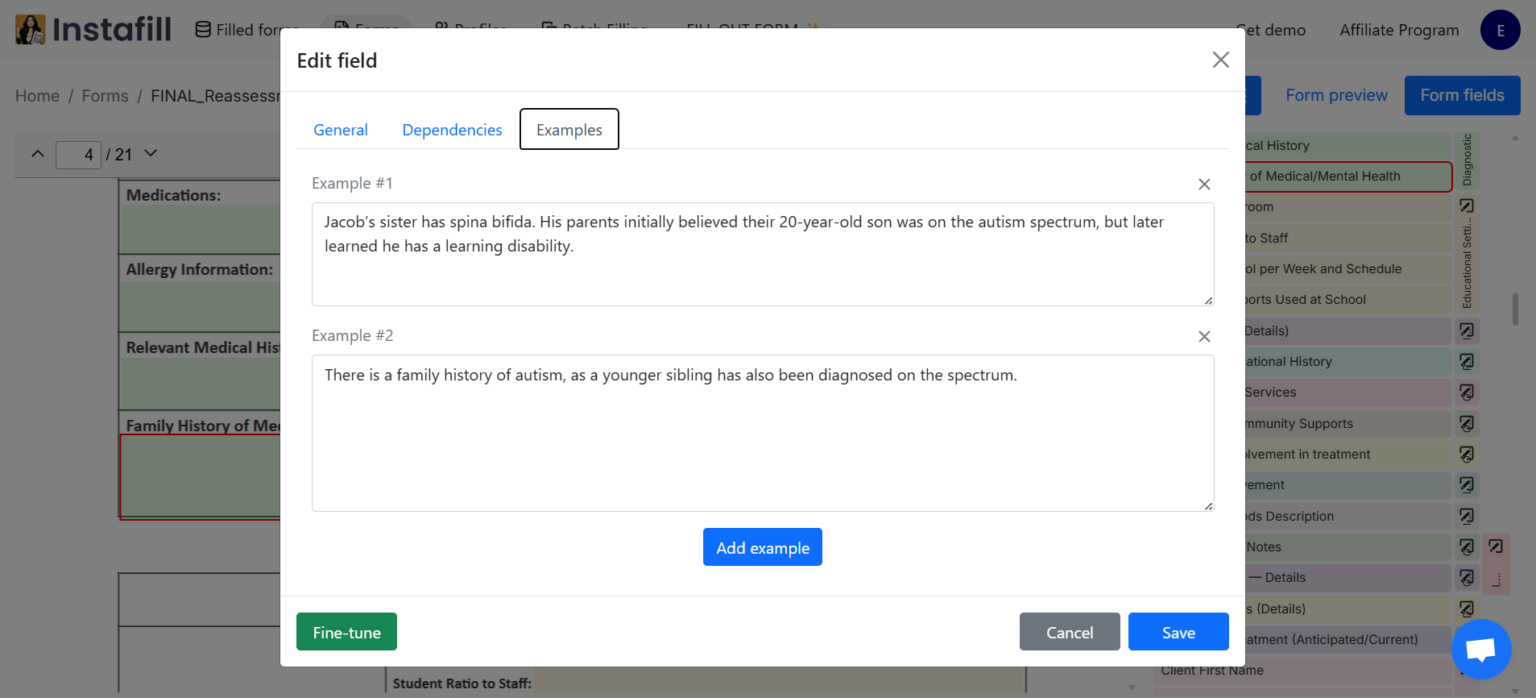
Step 4: Paste or type examples of how you’d write this specific field. Each example should represent well-written content that matches your voice for that field.
Step 5: Click Add example to include additional reference text if needed.
Step 6: Save your changes and test the form with real data to verify the output matches your style.
When it makes a difference
This is most useful for fields where the AI generates text from your source data – behavioral observations, incident narratives, clinical summaries, project descriptions. For data fields like names, dates, or addresses, it isn’t needed.
Healthcare and ABA therapy
The challenge: Clinical reports contain numerous fields requiring generated text – behavioral observations, progress notes, assessment summaries. When filling these from session transcripts or raw data, AI-generated clinical language often sounds generic and templated, lacking the natural voice that comes from experienced practitioners.
How it helps: Upload a previously completed clinical report, or add writing samples from your actual documentation to specific fields. The AI learns your clinical writing voice – how you describe behaviors, reference treatment goals, and document interventions. When generating text from new session data, every field sounds natural and consistent with how your team writes.
Result: Reports are ready for submission immediately, with text that reflects your team’s voice – not a generic AI template.
Legal documents and contracts
The challenge: Legal documents contain fields requiring generated narrative text – incident descriptions, factual summaries, procedural explanations. AI-generated legal text often exhibits clear signs: excessive formality, repetitive phrasing, or sentence structure that experienced attorneys immediately recognize as automated.
How it helps: Upload a completed document from your firm, or add examples of key narrative sections from approved filings. The AI learns your firm’s writing conventions, preferred phrasing, and formatting standards. New documents maintain consistent voice and avoid the artificial quality of generic output.
Result: Documents reflect your firm’s standards automatically – language that sounds like it came from your attorneys, not automated software.
Additional use cases
Any workflow where authentic, human-written generated text matters benefits from examples:
- Insurance claims: Generate incident descriptions and damage assessments from adjuster notes while maintaining your company’s voice
- Grant applications: Generate narrative sections from research data while preserving your organization’s writing style
- Real estate contracts: Generate property descriptions and disclosures with your firm’s terminology
- HR documentation: Generate performance reviews and incident reports from notes while keeping your company’s consistent tone
- Financial reports: Generate analyses and summaries from data with a uniform voice across documents
Examples vs. field descriptions: When to use each
Both examples and field descriptions are tools for customizing how forms are filled. They serve different purposes and work best together:
| Scenario | Best approach |
|---|---|
| Specify a required format (dates, phone numbers) | Field description |
| Explain conditional logic or special rules | Field description |
| Define tone, writing style, or narrative structure | Examples |
| Show how to structure long-form generated text | Examples |
| Demonstrate specific phrasing or terminology | Examples |
| Maintain consistent voice across similar fields | Examples |
| Avoid AI-sounding generated text | Examples |
Using both together: For best results, combine field descriptions with examples. Use descriptions to explain rules and constraints (“Use MM/DD/YYYY format” or “Skip if applicant is under 18”), and examples to demonstrate voice and style for generated content. The AI considers both when filling fields.
Why showing examples works better than writing instructions
1. Most people can’t accurately describe their own writing voice
They might say “professional but friendly” or “clear and concise,” but these descriptions are subjective and don’t capture the specific patterns in their actual writing. Examples let the AI analyze real writing, not a description of it.
2. Examples provide concrete patterns
When you say “use a conversational tone,” different people interpret that differently. When you show three examples of your actual writing, the AI sees exactly what “conversational” means to you – your specific vocabulary choices, sentence lengths, and phrasing patterns.
3. Multiple dimensions are analyzed simultaneously
A single example contains information about tone, vocabulary, structure, formatting, and more. The AI extracts all these dimensions at once, understanding how they work together in your voice. Instructions would require you to explicitly describe each dimension separately – and you’d likely miss things you do naturally without noticing.
How the AI processes examples
Individual field processing
Standard fields are filled in batches for efficiency. Fields with examples are processed individually, allowing the AI to focus exclusively on matching your reference style. This higher attention produces more accurate voice replication.
Pattern recognition across examples
When you provide multiple examples, the AI identifies patterns that appear consistently across them. This helps distinguish between your general voice – which should be replicated – and specific content details that are unique to each example.
Context-aware application
The AI doesn’t copy your examples – it applies your voice to new content. It learns your style, then uses that style to express whatever information needs to go in the field. The vocabulary and phrasing match your voice; the facts come from your input data.
Best practices
1. Choose representative examples
Pick examples that truly represent how you want the field filled. Don’t use examples that were rushed or don’t match your usual quality. The AI will replicate whatever you show it.
2. Use 2–4 examples per field when adding manually
While there’s no limit, 2–4 well-chosen examples are usually sufficient. More examples help the AI identify consistent patterns, but beyond 4–5, the improvement is marginal.
3. Vary your examples slightly
If all your examples are nearly identical, the AI might replicate too closely. Show slight variation in how you express similar ideas – this helps the AI learn your voice rather than memorize specific phrases.
4. Test and refine
After setting up examples, run the form with real data and review the generated output. You can always upload additional completed forms, add more manual examples, or edit existing ones to improve results.
5. Focus on fields that require generated text
Name fields, dates, and addresses don’t benefit from voice replication – they’re straightforward data entry. Focus on narrative fields, descriptions, explanations, and any text where tone and phrasing matter.
Getting started
The feature is available directly from any form details page – no setup required on our end.
- Go to your Forms section and open any form
- Click Field Examples in the Quick actions panel on the right side of the form details page
- Upload a previously filled PDF of that form – Instafill.ai will extract examples automatically
- Review the reference table to confirm the extracted values look right
- Fill the form with new data and review how the AI replicates your style
For fields where you want more precise control, use the Form fields tab to add or edit examples manually per field.
If you have questions or want help getting this set up for your specific forms, reply here or write to [email protected].
Why this matters
The difference between a tool that fills out forms and a platform that understands professional document workflows is whether the output is usable as-is. Generic AI text requires editing every time. Text that matches your voice doesn’t.
What makes this work isn’t a simple style setting or tone slider – it’s the AI analyzing your actual writing across multiple dimensions simultaneously, then applying those patterns consistently to new content. The vocabulary and structure match your voice; the facts come from your data. When you work with Instafill.ai, you’re working with a platform built to understand professional document workflows and solve them systematically – not just fill in blanks.