
Starting today, the Instafill.ai Agent is available in every Instafill.ai account, with no custom setup. Tell the Agent what you want done in your own words, add the files it needs, and let it work from there.
Over the past few months, we’ve shared updates about the Instafill.ai Agent and what it can do. Until now, the Agent was set up for individual customers around their own workflows. Now the same kind of Agent is open to everyone: click the new Agent button in the top menu and start.
There’s no fixed workflow or prompt list to learn. Describe the task the way you’d explain it to a colleague.
The Agent decides what to do: which file is the form, where the data comes from, and what’s still missing. You don’t need to pick a mode, map fields, or follow the same steps every time. The same Agent handles a quick one-page form and a longer task with several documents.
Where to find the Agent
The Agent has its own button in the top menu of your Instafill.ai workspace. Click it, type what you need in the message box, attach your files, and send.
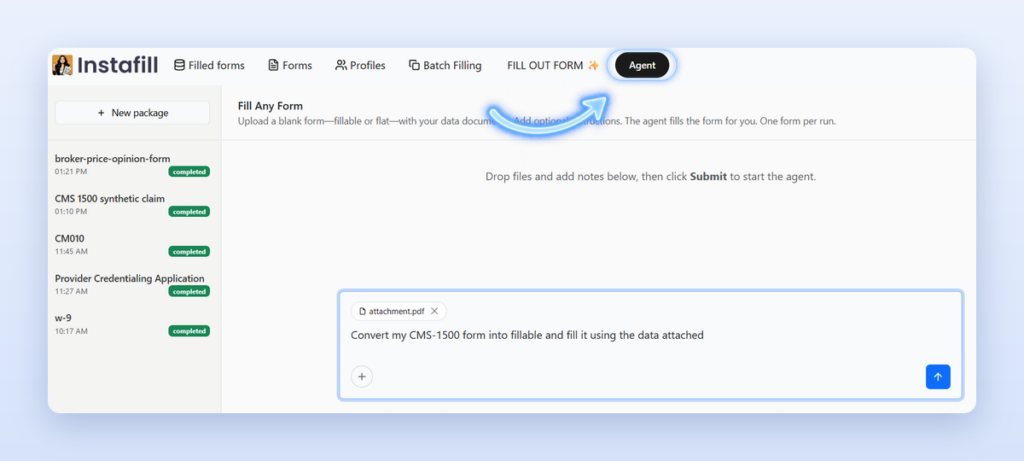
Just tell it what you want done
You write the request in plain language. A few examples of what you can type:
“Fill my Uniform Residential Appraisal Report using the attached appraisal data.”
“Here’s a scanned form and my notes. Make it fillable and fill it in.”
“Use these files to complete this form. Ask me if anything important is missing.”
You can also ask the Agent a question instead of giving it a task. For example, “Have I filled the broker price opinion form before?” The Agent checks the forms in your workspace and tells you whether that form was filled and when.
What helps the Agent get it right
There’s no special syntax, but a clear request usually mentions three things:
- Which form you need. Attach it, or name a form you already have in your workspace.
- Where the data is. Attach the documents, or type the details straight into the message.
- Anything specific about the result. For example, a value that should be used everywhere, or a section that should stay empty.
If you leave something out, that’s fine. The Agent works with what you gave it and asks when something important is missing.
What the Agent can work with
Files or plain text
Last year’s application, a tax statement, a letter from a partner. If some information isn’t in a file, type it in the message and the Agent uses it too. You don’t need to put everything into one document first.
Forms you already uploaded
The Agent can see the forms in your workspace, so you don’t need to upload the same template again. You can also ask whether you’ve filled a particular form before.
Flat or fillable forms
A scan, a printout, or a PDF with no form fields works too. The Agent makes it fillable as part of the same run, so you don’t have to convert the form separately before filling it. Learn more about flat-to-fillable conversion.
It can ask you instead of guessing
If something important is missing or unclear, the Agent pauses and asks. It tells you what it needs, and you decide how to provide it.
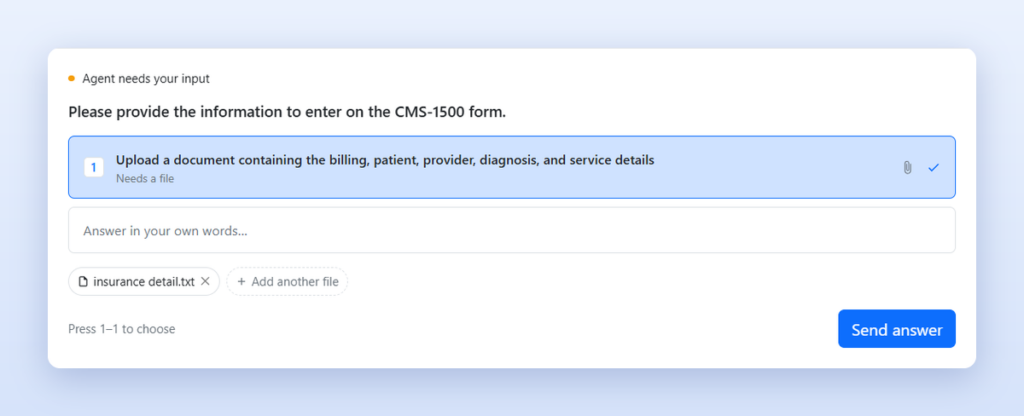
This matters most on forms where a wrong guess is worse than an empty field. Instead of filling a field with something that only looks right, the Agent checks with you first and then keeps going from where it stopped.
What it does for you
Remembers past fills
Ask it to “fill out my CMS 1500 using previously uploaded data” and the Agent can reuse the documents from your previous fill with the new instruction. For forms you complete regularly, you don’t have to gather and upload the same source files every time.
Keeps the package open
After a run, you can add more files or notes and run it again without starting from scratch. Earlier results stay available, and your recent packages stay in the sidebar so you can come back to them later.
Reports what it filled
When a run finishes, the Agent tells you how many fields it completed, so you can quickly see if anything may need your attention.
Your first run, step by step
Step 1: Open the Agent
Sign in to Instafill.ai and click Agent in the top menu.
Step 2: Describe the task and add your files
Type what you want done, attach the form and the documents with your data, and send the request. If the form is already in your workspace, you can simply name it.
Step 3: Answer if the Agent asks
If the Agent needs more information, reply in your own words or attach another file. The run continues from the same point.
Step 4: Review the result
Check the report of what was filled and look over the completed form. If you want changes, add more files or notes to the same package and run it again.
Available in every account
The Agent is already available in your Instafill.ai workspace, including free accounts. There’s nothing to turn on and nothing to install.
Need an Agent built around your process?
If your workflow needs company-specific rules, knowledge, integrations, or custom document actions, we can also set up a dedicated Agent around your process. Book a discovery call and show us how it works.
Frequently asked questions
Do I need to set anything up to use the Agent?
No. The Agent is available in every Instafill.ai account with no custom setup. Click Agent in the top menu and describe your task.
Is the Agent available on free accounts?
Yes. The Agent is available in every Instafill.ai workspace, including free accounts.
Do I have to write my request in a specific way?
No. There’s no fixed workflow or prompt list to learn. Write the request the way you’d explain it to a colleague.
Can the Agent fill a scanned or flat PDF?
Yes. A scan, a printout, or a PDF with no form fields works too. The Agent makes it fillable as part of the same run.
What happens if my files don’t have all the information?
If something important is missing or unclear, the Agent pauses and asks. Answer in your own words or attach a file, and the Agent continues the same run.
Do I need to upload a form I’ve already used?
No. The Agent can see the forms in your workspace, and it can reuse the documents from your previous fill when you ask it to.
Can I add files after a run is finished?
Yes. The package stays open. Add more files or notes and run it again without starting from scratch. Earlier results stay available.
Try it on the work you actually do
The best way to see what the Agent can do is to give it a real task from your day: the form you fill every week, the packet that’s waiting in your inbox, the scan nobody wants to retype. We’ll keep expanding the Agent based on the tasks people give it. If there’s something you’d like it to handle, let us know what you asked it to do.