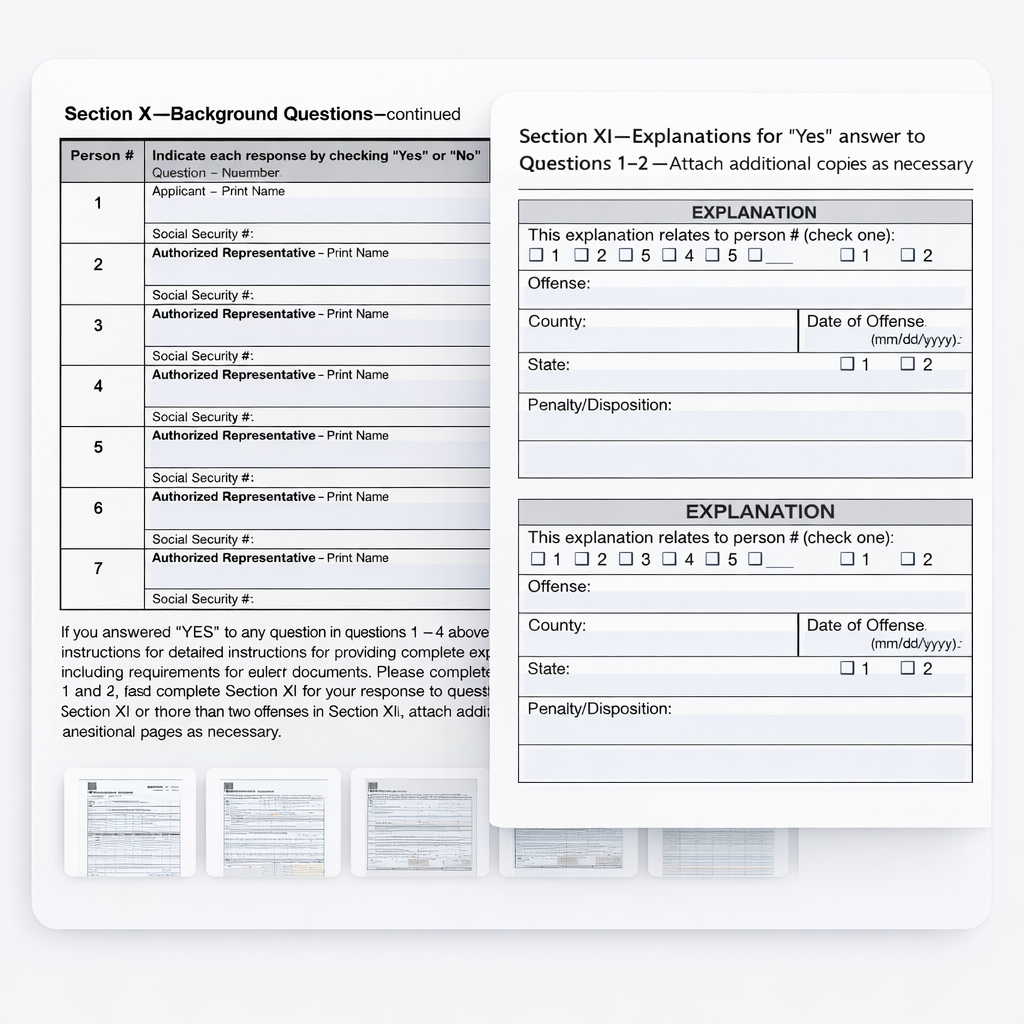
Some forms repeat the same group of fields several times – once for every job, person, property, owner, facility, or location. The sections may look nearly identical, but each one needs to be filled from a different source record.
We’ve improved how Instafill.ai detects and fills these repeated sections, tables, and lists. The AI now identifies repeatable structures automatically during fine-tuning, and fills tables row by row instead of in a single pass – keeping each record mapped to the right place across the form.
Previously, our AI could occasionally fill these sections incorrectly. Information might be duplicated where it shouldn’t be, data could be mapped to the wrong section instance, or a value could land one column over in a wide table. This happened because the system didn’t always distinguish between identical field structures that appeared multiple times.
The solution
The AI now automatically identifies repeatable sections during form processing. The system analyzes the complete form structure, recognizes when identical field groups repeat across pages, and maps each section distinctly.
How it works: During fine-tuning, the AI receives the complete form structure in a structured format. It analyzes field groups, identifies patterns, and determines which sections are repeatable. This information is then used when filling the form to ensure each data entry goes to the correct section instance.
What changed during filling: instead of filling the whole structure in a single pass, Instafill.ai now works through it row by row. It reads the column headers, then places each record into its own row – one at a time – so a value from the first record cannot spill into the second.
Lists are handled as a separate data type from tables: each item maps to its own line, and only rows that actually have data get filled – no phantom entries in the empty ones. The process runs automatically, with no manual setup.
Forms where this shows up
These are common examples of repeated sections, tables, and lists:
- Florida DBPR CILB 6-B – the same Explanation section repeats three times on consecutive pages.
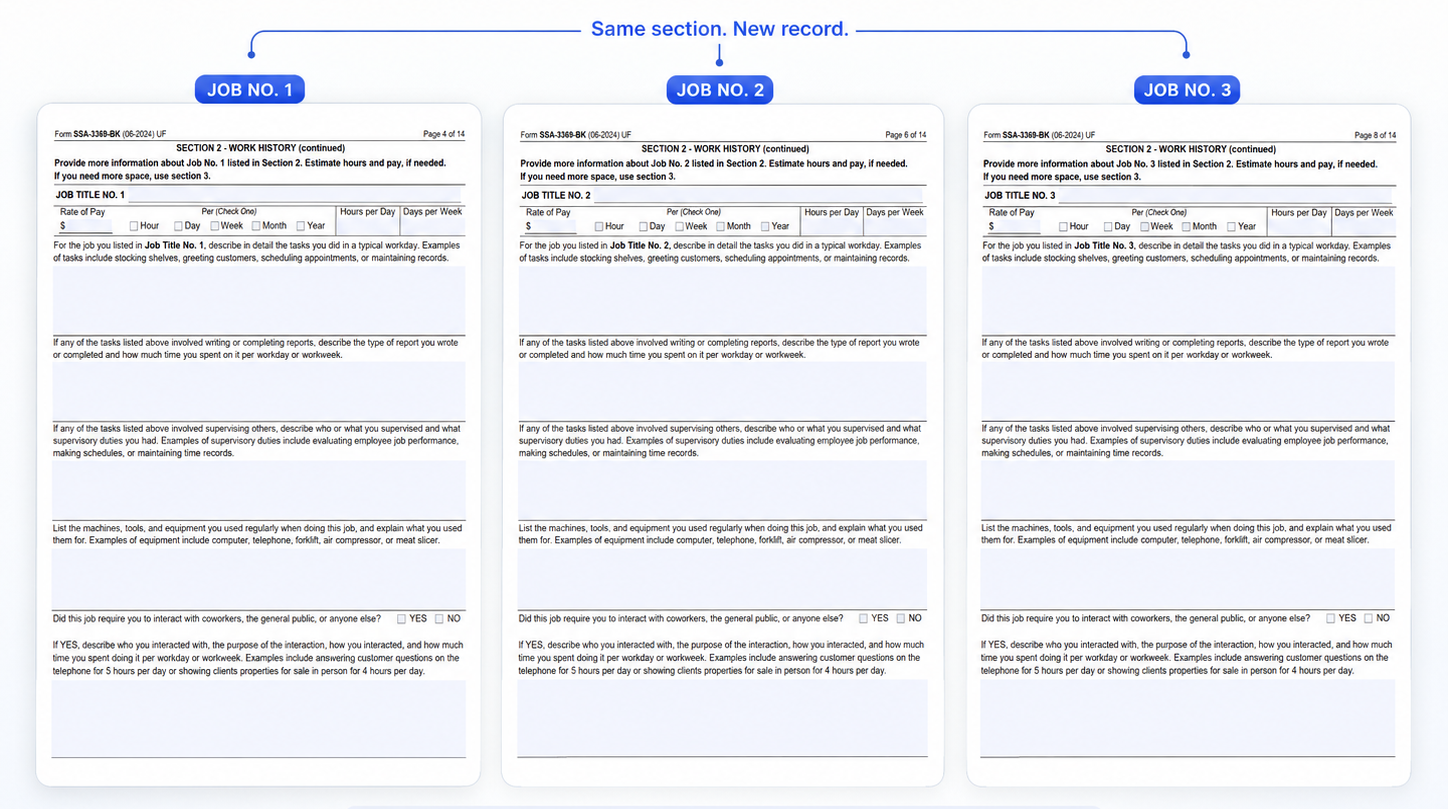
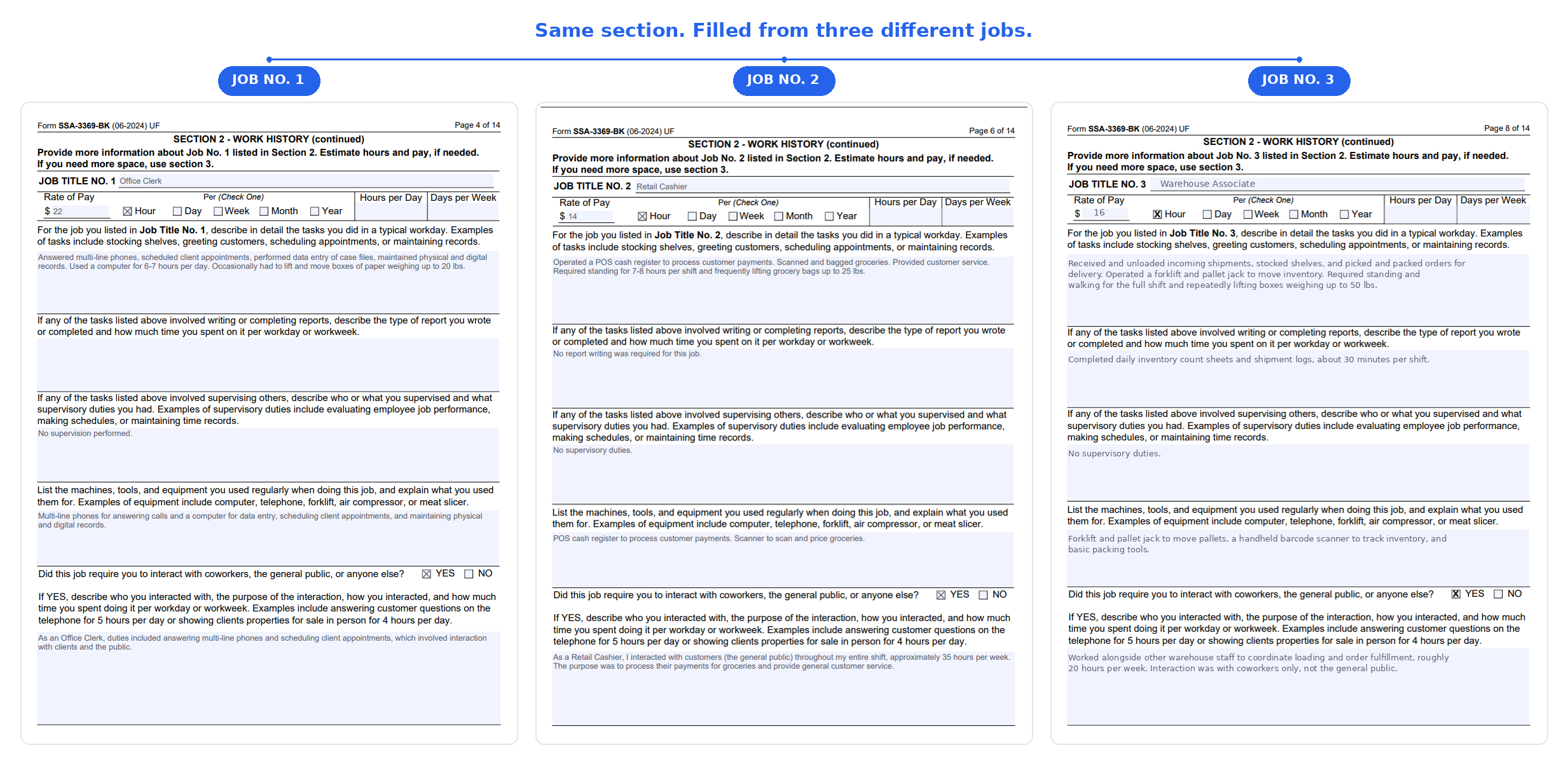
- SSA-3369-BK Work History Report – a two-page block repeated for each job.
- CMS-1500 – service line tables with procedure codes, dates of service, and charges.
- Schedule D – one row per capital gains transaction.
- I-485 – employment history entries, one block per employer.
- Corporate filings – Officer #1 on page 2, Officer #2 on page 3, Officer #3 on page 4.
Real example: repeated sections
The Florida DBPR CILB 6-B application for Certified Building Contractor is an 18-page form that contains an Explanation (and other) section repeated three times on consecutive pages. Each block reuses the same labels and structure.
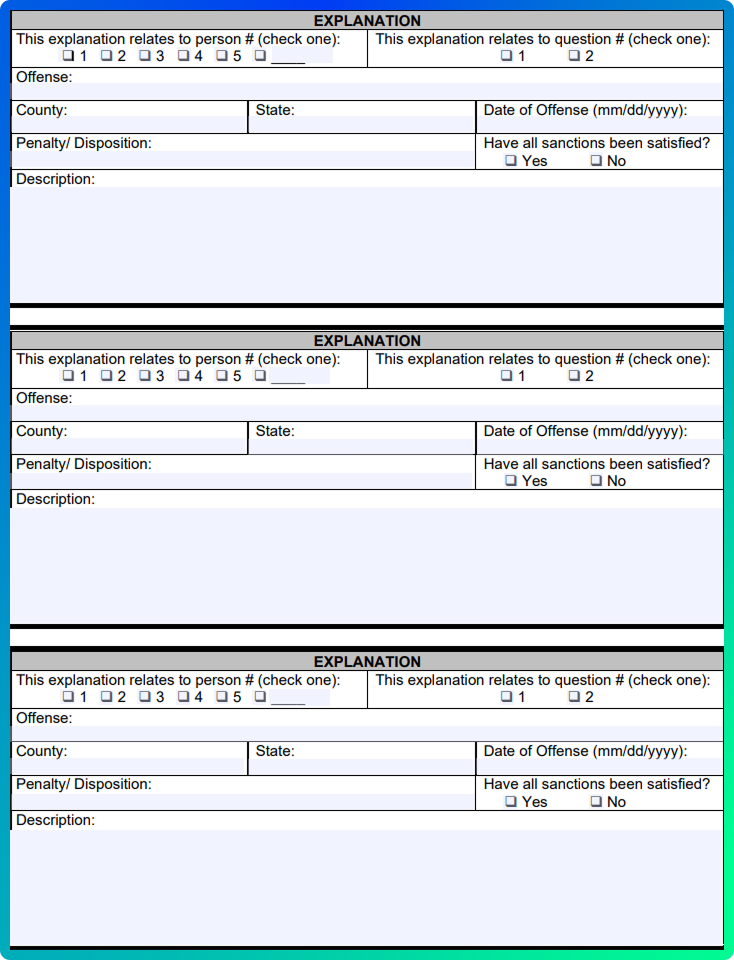 |
Example of repeatable sections: several identical Explanation blocks in a multi-page contractor application.
With the new processing, Instafill.ai now correctly identifies these as three distinct explanation entries and fills out each one with the appropriate data from your source documents, without duplication or confusion. Remaining blocks stay empty instead of being partially filled or carrying over values from previous entries.
See it on a longer form: SSA-3369-BK
The SSA-3369-BK Work History Report is a 14-page form with the same two-page section repeated for each job. The field structure stays the same, while pay, duties, tools, hours, and other details change from one job to the next.
Before filling
Three job sections with the same structure.
After filling
Each section is filled from its own job record.
Tables, filled row by row
Repeated sections are one shape this takes. The other is a table: each row is a separate record, each column a separate field. Instafill.ai reads the header row, then fills one record per line.
A harder case: when the table runs both ways
Some tables are harder than a simple list of rows. A Broker Price Opinion form, for example, has headers along the top and down the side: each column is a different property – the subject and several comparables – while each row is an attribute, such as address, square footage, condition, or sale price. A single cell only makes sense as the intersection of the two.
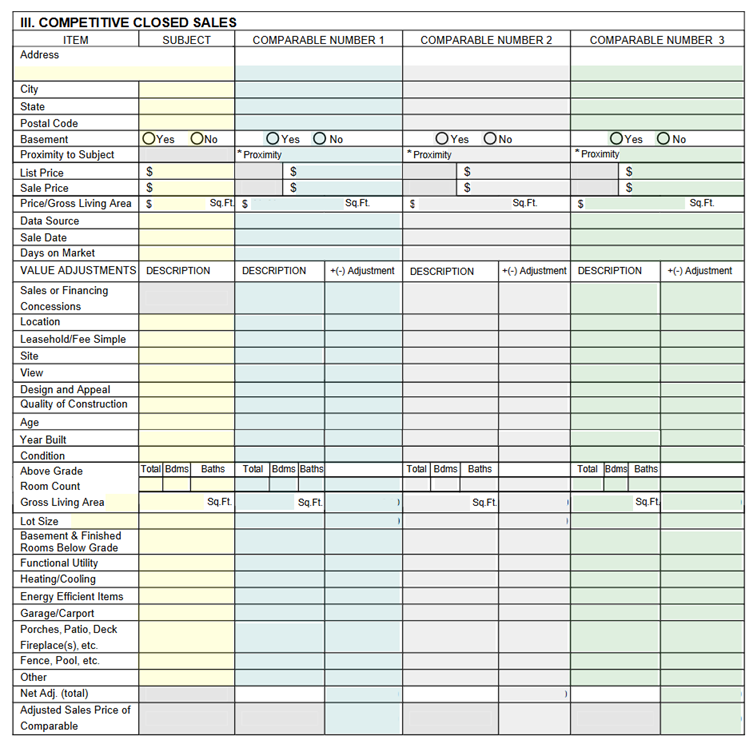
On a grid like this, Instafill.ai works across one row at a time – reading the attribute on the left, then placing each property’s value under its own column. Your sources can be separate files, one per property, or a single document covering all of them. Each column stays tied to its own property, so a comparable’s sale price or square footage doesn’t drift into the column next to it, and columns you have no data for stay empty.
What this means for you
✓ More accurate record mapping
Each person, job, property, or other record is directed to its corresponding section, eliminating errors from section confusion.
🚫 No duplicated or misplaced values
Information is less likely to carry into another repeated block or land in the wrong section.
📊 Values land in the right column
In wide tables with many columns, each value is matched to its column header instead of being shifted one cell over.
📋 Unused sections and rows remain empty
When the form has more repeated sections or rows than there are source records, the remaining blocks are not filled from earlier entries.
⚡ Automatic detection
No configuration needed. The AI identifies repeatable sections during fine-tuning and uses them for future fills.
Who this helps most
You’ll see the most benefit if you work with:
- Government and employment forms where the same block repeats per job, officer, owner, or location.
- Licensing and credentialing packets that capture long lists of jobs, roles, or facilities.
- Medical and financial forms with line-item tables – service lines, transactions, medications, expenses.
- Real estate and construction documents – comparable properties, project history, or contractors.
- Any application where the same section repeats for several separate people, properties, or entities.
| Behind the scenes: Repeatable sections are stored in a dedicated section in the form configuration, keeping the data structure cleaner and easier to maintain over time. Lists are tracked as a distinct data type from tables, so each behaves according to its own structure. |
Availability
If your workflows involve forms with repeating sections, tables, or cross-page logic, this update ensures more accurate automation without extra manual effort. No additional setup is required – simply upload your forms as usual, and the system will handle section detection and row-by-row filling in the background. It’s now live for all Instafill.ai users, on free and paid accounts – try it with your next complex PDF form.
Have a form with repeated sections or tables? Upload it to Instafill.ai and see the improved accuracy in action.
If you have a specific packet you’d like us to review, reply to this email or send it to [email protected].